
ladies at autoexpo
CHECK ALL THE BEAUTIES AT AUTO EXPO WITH THEIR CARS AND CHECK ALL ENTERTAINMENT NEWS .

FACEBOOK TRICK UPSIDE DOWN
ENJOY FACEBOOK TRICKS AND TIPS AND UPDATES PROVIDED AND ALMOST EVERY TRICKS AND TIPS UPDATING DAILY .

OLD AND NEW SONGS DOWNLOADS
DOWNLOAD ALL TELUGU SONGS NEW SONGS AND OLD SONGS ,ALL UPDATED ,ARRANGED IN SYMBOL-WISE SEARCH .

DOWNLOAD BEAUTIFUL WALLPAPERS
DOWNLOAD ALL KINDS OF WALLPAPERS LIKE CARS , ACTRESS , ABSTRACT , AND ALMOST ALL KINDS ... .

celebrities caught
ENJOY THE CONTENT PROVIDED FOR REGULAR VIEWERS FOR MY WEBSITE , DAILY REFRESHED CONTENT .
Saturday, 14 April 2012
Friday, 11 November 2011
Monday, 7 November 2011
FACEBOOK SHORTCUTS

If you spend a lot of time on Facebook then why not spend it more efficiently.There are a lot of browser specific keyboard shortcuts for Facebook.You can create new Messages, View Account Settings, View Notifications etc .Once you get familiar with these shortcuts you can easily navigate on facebook.In this post I will give the shortcut keys for Google Chrome,Firefox and Internet Explorer.
Here is a comprehensive list of facebook Shortcuts for each browser.
Google Chrome Facebook Shortcuts
- Alt+1: View your News Feed
- Alt+2: View your own Profile
- Alt+3: View pop-up of friend requests
- Alt+4: View pop-up of messages
- Alt+5: View pop-up of notifications
- Alt+6: View Account Settings
- Alt+7: View Privacy Settings
- Alt+8: View Facebook’s own profile
- Alt+9: Read latest Terms of Service agreement.
- Alt+?: Search
- Alt+m: Compose a new message
If you are using Firefox browser then you also need to press SHIFT along with the above shortcut keys.
Firefox Facebook Shortcuts
- Shift+Alt+1: View your News Feed
- Shift+Alt+2: View your own Profile
- Shift+Alt+3: View pop-up of friend requests
- Shift+Alt+4: View pop-up of messages
- Shift+Alt+5: View pop-up of notifications
- Shift+Alt+6: View Account Settings
- Shift+Alt+7: View Privacy Settings
- Shift+Alt+8: View Facebook’s own profile
- Shift+Alt+9: Read latest Terms of Service agreement.
- Shift+Alt+0: Open Facebook Help Center
- Shift+Alt+?: Search
- Shift+Alt+m: Compose a new message
If you are using Internet Explorer then you you can use the Facebook shortcuts of Google chrome,but you have to press ENTER after each shortcut .
Sunday, 30 October 2011
Untitled
www.allinonestudentscorner.blogspot.com
A site for downloads , entertainment , games , technology ,news around the world ,songs downloads , learning resources like english ,photoshop,hacking ,wallpapers ,screen savers,S .OFTWARES ,HEALTH TIPS..............and much more IF U LIKE SITE PLZ JOIN MY SITE........THANKS
Friday, 28 October 2011
Speaking Image
Speaking Image
 Speaking Image simply put is a cool site. This is a site where users can add multi-media content to an image such as: markers (for annotating), wiki articles, lines, etc. Also, this is a collaborative site where users can allow others to edit their images.
I highly recommend checking out Speaking Image by clicking here!!!
http://www.speakingimage.org/

Saturday, 22 October 2011
Add Smileys In Posts,Status Updates & Comments, Get Free Facebook Skins For New Facebook
There are lots of skins available for old Facebook profile layout and to install those they required only mozilla firefox Browsers. Now here’s a new way to add Free Facebook skins/Themes For New Facebook profile and this works on all three major Web Browsers ie Firefox, Google Chrome and Safari. Yes am talking about Social Plus- an awesome Plugin that allows you to have cool skins/Themes For New Facebook profile too. Already more than 3,00,000 users has installed their Chrome extension. Social+ allows you to add a number of features to Facebook.
Also We’ve all noticed that smileys on Facebook don’t show up in posts, status updates and comments. and many fraud 3rd party websites are Spreading Spam in the name of Smileys. It’s time to get rid of those horrible!! The extension automatically replaces all smiley characters with smiley images. You’ll see Facebook and your friend’s moods through new eyes.
Though Social+ also allows you to add Bold, italic and colored status updates characters, i Recommend not use these features because if your Friend is not using social+ then he/she may see the Status update in the weird format. see the example Below:

[ * ] No harm in using Smileys. 
 -How Do i Add Social+ to my Profile ?
- Goto Social Plus Download page,
- http://www.social-plus.net/en/download.php you will see your the Plugin for your browser will be automatically Hilighted.
- Now Download The Plugin and install it.
- After installation Open your Facebook Profile, you will see another Button Beside the Account Button. Now with this ‘Social Plus’ Button you can Manage all the features offered by Social+.
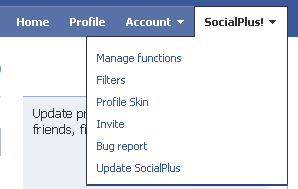
To Change your Profile Skin Just click “Profile Skin’ and Choose from over 500 Skins/Background
Monday, 17 October 2011
airtel-hack-for-free-internet
FIRST METHOD:
1) Connecting Device : Your mobile’s modem
2) ISP Name : anyname (anything you like)
1) Connecting Device : Your mobile’s modem
2) ISP Name : anyname (anything you like)
3) Phone Number : *99***3# / Try 99***1
4) Username and Password : blank
5) Configure your browser and download manager to use the proxy
100.1.200.99 and port 8080.( My advice is to use Opera since you
can browse both wap and regular websites)
6) Connect to the dial-up account. You will be connected at 115.2
kbps (but remember, that is a bad joke).
7) Pick up your mobile and try to access any site. You will get “Access
Denied…”(except for Airtel Live!). IT DOES NOT MATTER.
Keep the mobile down.
8 ) On the PC ( or Laptop) open your browser, enter any address ,
press ENTER and…….WAIT
9) After a few seconds the page will start to load and you have the
Whole Internet at your Disposal.
4) Username and Password : blank
5) Configure your browser and download manager to use the proxy
100.1.200.99 and port 8080.( My advice is to use Opera since you
can browse both wap and regular websites)
6) Connect to the dial-up account. You will be connected at 115.2
kbps (but remember, that is a bad joke).
7) Pick up your mobile and try to access any site. You will get “Access
Denied…”(except for Airtel Live!). IT DOES NOT MATTER.
Keep the mobile down.
8 ) On the PC ( or Laptop) open your browser, enter any address ,
press ENTER and…….WAIT
9) After a few seconds the page will start to load and you have the
Whole Internet at your Disposal.
SECOND METHOD:
First Go to settings menu then to connectivity tab now choose the option Data comm. then "DATA ACCOUNTS" go to new account now the settings r as follows
ACCOUNT TYPE:GPRS
NEW ACCOUNT NAME:A1
APN:airtelfun.com
User name: (blank)
Password: (blank)
ACCOUNT TYPE:GPRS
NEW ACCOUNT NAME:A1
APN:airtelfun.com
User name: (blank)
Password: (blank)
Now save it
NOW!
Go to Internet Setting in connectivity here choose intrnet profile--go to new profile setting are As below
NAME:A1
CONNECT USING:A1(which was created in data comm.)
Save It
Now you would be able to see it now selest it and take "more" option then select setting here in use proxy option it will be selected no if it is no then change it into yes
Now Go to Proxy address and give the adress as
100.1.200.99 and then the port number as 8080
User name:
Password:
NOW!
Go to Internet Setting in connectivity here choose intrnet profile--go to new profile setting are As below
NAME:A1
CONNECT USING:A1(which was created in data comm.)
Save It
Now you would be able to see it now selest it and take "more" option then select setting here in use proxy option it will be selected no if it is no then change it into yes
Now Go to Proxy address and give the adress as
100.1.200.99 and then the port number as 8080
User name:
Password:
Now save all the settings You made . Come back 2 connectivity
choose streaming settings now in connect using option choose a1 that we created leave the use Proxy option as no itself.
choose streaming settings now in connect using option choose a1 that we created leave the use Proxy option as no itself.
These Are The Settings :
Now access airtellive! from ur activated SE phone goto VIDEO GALLERY OR VIDEO UNLIMITED(varies according to states) choose live streaming then choose CNBC OR AAJTAK WHILE CONNECTING TO MEDIA SERVER cancel AFTER 9 or 10 sec then type any web adress if it shows access denied then once again select CNBC and wait for a few more sec than before if its fully connected also no prob its free then cancel it or if ur connected then stop it and the internet is ready to take of .
GOOD LUCK SE AIRTEL USERS


